Transforms
transforms is a collection of commonly used
functions, used to change or transform, the datasets/parameters.
Transforms module is divided as, - Coordinate transforms: Mapping the
coordinates of a configuration to invariant representations, which can
be used in ML models. - Descriptors - Radial Graphs - Properties:
Transform properties associated with the configurations. Often it takes
input as a complete dataset, and aggregate statistics of property of
entire dataset before transformations like normalization -
Parameters ( only available for the physic based models for now )
Transform the parameter space for enabling better
sampling/training.
Configuration Transforms
Descriptor
The Descriptors module bridges the
libdescriptor library
with KLIFF’s data structures (i.e., Configuration,
NeighborList). It provides:
show_available_descriptors(): A helper function that prints all descriptor names.Descriptor:Takes a
cutoff,species,descriptor name, andhyperparameters.Computes descriptors (
forward) and their derivatives w.r.t. atomic coordinates (backward).Can store results directly in the
Configurationobject’s fingerprint.
default_hyperparams: Module containing collection of sane defaults for different descriptors
Tip
This module relies on the optional dependency libdescriptor.
conda install -c ipcamit libdescriptor
from kliff.transforms.configuration_transforms.descriptors import show_available_descriptors
show_available_descriptors()
--------------------------------------------------------------------------------
Descriptors below are currently available, select them by descriptor: str attribute:
--------------------------------------------------------------------------------
SymmetryFunctions
Bispectrum
SOAP
from kliff.transforms.configuration_transforms.descriptors import Descriptor
from kliff.transforms.configuration_transforms.default_hyperparams import symmetry_functions_set30

desc = Descriptor(cutoff=3.77,
                  species=["Si"],
                  descriptor="SymmetryFunctions",
                  hyperparameters=symmetry_functions_set30())
This Descriptor module is designed to work as a thin wrapper over
libdescriptor library, and provides forward and backward
function for computing the descriptors, and their vector-Jacobian
products for gradient. Given below is a brief overview of how typical ML
potential evaluates forces, and how it is achieved in KLIFF.
Theory of ML with descriptors
Descriptors ( ) are used in machine learning to transform
raw input features (
) are used in machine learning to transform
raw input features ( ) into a higher-dimensional
representation that captures more complex patterns and relationships.
This transformation is particularly useful in various applications,
including molecular dynamics, material science, and geometric deep
learning.
) into a higher-dimensional
representation that captures more complex patterns and relationships.
This transformation is particularly useful in various applications,
including molecular dynamics, material science, and geometric deep
learning.
Forward Pass
Descriptor Calculation
The input features
 (e.g., atomic coordinates, molecular
structures) are mapped to a higher-dimensional space using a
function
(e.g., atomic coordinates, molecular
structures) are mapped to a higher-dimensional space using a
function  .
.The output of this mapping is the descriptor
:

Model Prediction:
The descriptor
is then used as input to a machine
learning model (e.g., neural network) to make predictions:

Backward Pass
Loss Calculation:
A loss function measures the difference between the model’s predictions and the ground truth:

Derivative of Loss with Respect to Descriptors:
During backpropagation, the first step is to compute the derivative of the loss with respect to the descriptors:

Vector-Jacobian Product:
The next step is to compute the derivative of the descriptors with respect to the input coordinates
 . This is
represented by the Jacobian matrix:
. This is
represented by the Jacobian matrix:
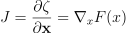
To efficiently compute the gradient of the loss with respect to the input
, we use the vector-Jacobian product:

Gradient Flow:
The gradients are then used to update the model parameters during optimization (e.g., gradient descent):

where  is the learning rate.
Forces
Forces for an ML model can be evaluated similary
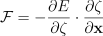
See example below.
KLIFF Descriptor backward and forward
# generate Si configuration
from ase.build import bulk
from kliff.dataset import Configuration
import numpy as np

Si_diamond = bulk("Si", a=5.44)
Si_config = Configuration.from_ase_atoms(Si_diamond)

# FORWARD: generating the descriptor $\zeta$
zeta = desc.forward(Si_config)

# BACKWARD: vector-jacobian product against arbitrary vector (\partial L/\partial \zeta)
dE_dZeta = np.random.random(zeta.shape)

forces = - desc.backward(Si_config, dE_dZeta=dE_dZeta)
print(forces)
[[-0. -0. -0.]
 [-0. -0. -0.]]
Radial Graphs
Similarly users can also generate radial graphs for graph neural networks.
from kliff.transforms.configuration_transforms.graphs import RadialGraph

graph_generator = RadialGraph(species=["Si"], cutoff=3.77, n_layers=1)

# dummy energy, needed for eval
Si_config._energy = 0.0
Si_config._forces = np.zeros_like(Si_config.coords)

print(graph_generator.forward(Si_config))
PyGGraph(energy=0.0, forces=[2, 3], n_layers=1, coords=[54, 3], images=[54], species=[54], z=[54], cell=[9], contributions=[54], num_nodes=54, idx=-1, edge_index0=[2, 14])
Due to overloaded __call__ method, you can also use the the RadialGraph module as a
“function call”.
graph = graph_generator(Si_config)

print(graph.keys())
['cell', 'coords', 'energy', 'contributions', 'images', 'z', 'species', 'idx', 'forces', 'num_nodes', 'edge_index0', 'n_layers', 'shifts']
The meaning of these keys are defined below:
Parameter |
Description |
|---|---|
|
The simulation cell dimensions, typically a 3×3 tensor representing the periodic boundary conditions (PBC). |
|
Cartesian coordinates of the atomic positions in the structure. |
|
Total energy of the system, used as a target property in training. |
|
Energy contributions from individual atoms or interactions (optional, depending on model), equivalent to batch index |
|
mapping from ghost atom number to actual atom index (for summing up forces) |
|
Atomic numbers of the elements in the structure, serving as node features. |
|
unique indexes for each
species of atom present
(from 0 to total number of
species present, i.e. for
H2O, |
|
Internal index of the configuration or dataset, set to -1 as default. |
|
Forces acting on each atom, often used as labels in force-predicting models (for contributing atoms). |
|
Number of nodes (atoms) in the graph representation of the structure (including contributing and non-contributing atoms). |
|
Connectivity information
(edges) in COO like format,
defining which atoms are
connected in the graph (2 x
N matrix). The storage
format is “staged graph”
where graph needed for each
convolution step
( |
|
Number of layers in the generated staged graph. |
|
vectors to add in the
position vectors of the
destination edge atom to get
correct vector in minimum
image convention like PBC.
When |
Minimum image convention vs staged graphs
The RadialGraph module provides functionality to both generate the staged graphs
for parallel convolution [see theory section] and conventional edge graphs for more
efficient training. It be accessed via mic keyword argument in the module (default
value False). Major difference between the two is that staged graphs explicitly
maps the ghost atoms, whereas the mic graph indexes the periodic images using a
shifts vector.
Example below highlights the difference between the two approach
The major difference between the two graphs is now that staged graphs always uses non-periodic atoms, and contains one graph per convolution. Therefore it contains unique edge-pairs for each edge. MIC graph only uses the original periodic atom image and hence contains one graph duplicate edges, but unique shift vectors.
tensor([[  0,   0,   0,   0,   1,   1,   1,   1,  77, 117, 125, 126, 134, 174],
    [  1,  77, 117, 125,   0, 126, 134, 174,   0,   0,   0,   1,   1,   1]])

tensor([[  0,   0,   0,   0,   1,   1,   1,   1,  76,  77,  77,  77,  77,  78,
          79,  86,  87, 116, 117, 117, 117, 117, 118, 119, 124, 125, 125, 125,
         125, 126, 126, 126, 126, 127, 132, 133, 134, 134, 134, 134, 135, 164,
         165, 172, 173, 174, 174, 174, 174, 175],
        [  1,  77, 117, 125,   0, 126, 134, 174,  77,   0,  76,  78,  86,  77,
         126,  77, 134, 117,   0, 116, 118, 164, 117, 126, 125,   0, 124, 132,
         172,   1,  79, 119, 127, 126, 125, 134,   1,  87, 133, 135, 134, 117,
         174, 125, 174,   1, 165, 173, 175, 174]])

tensor([[0., 0., 0.],
        [0., 0., 0.],
        [0., 0., 0.]], dtype=torch.float64)
print(mic_graph.edge_index0)
print(mic_graph.edge_index1)
print(mic_graph.shifts[0:3,:])
tensor([[0, 0, 0, 0, 1, 1, 1, 1, 1, 1, 1, 0, 0, 0],
        [1, 1, 1, 1, 0, 0, 0, 0, 0, 0, 0, 1, 1, 1]])


KeyError: 'edge_index1'


tensor([[ 0.0000,  0.0000,  0.0000],
        [ 0.0000, -2.7150, -2.7150],
        [-2.7150,  0.0000, -2.7150]], dtype=torch.float64)
However these differences are more cosmetic, and both graphs will yield equivalent results if used correctly:
pos_vectors_ghost = staged_graph.coords[staged_graph.edge_index0[1]] -
                        staged_graph.coords[staged_graph.edge_index0[0]]
pos_vectors_mic_incorrect = mic_graph.coords[mic_graph.edge_index0[1]] -
                        mic_graph.coords[mic_graph.edge_index0[0]]
print("Naive vectors:", torch.allclose(pos_vectors_ghost, pos_vectors_mic_incorrect)
print("Shift compensated vectors:", torch.allclose(pos_vectors_ghost,
                                            pos_vectors_mic_incorrect +
                                            mic_graph.shifts)) # add shift vectors to get correct result
Naive vectors: False
Shift compensated vectors: True
Tip
Rule of thumb is that MIC graphs are better at training for their efficiency, staged graphs are better at large scale simulations due to their parallelism and domain decomposition.